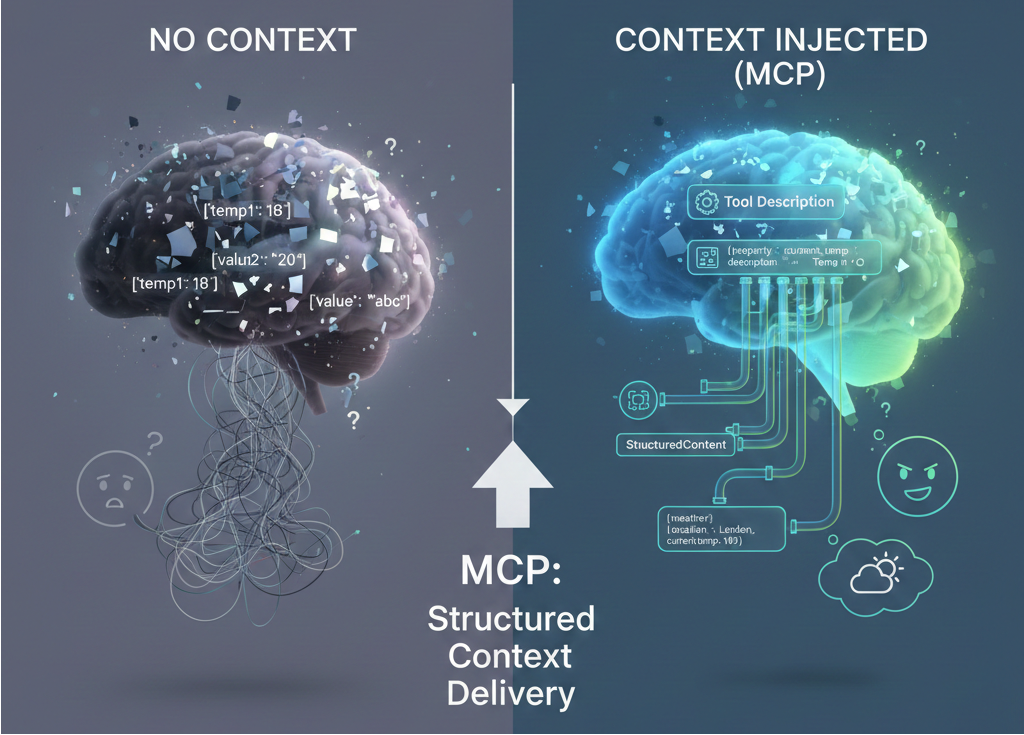
Lately, I’ve been experimenting with the Model Context Protocol (MCP). I had two things in mind when starting this experiment:
- How do LLMs (like GPT-4.1 or Claude Sonnet 4.5) make sense of ambiguous properties returned by an MCP Server tool?
- Can MCP Server provide context for these ambiguous properties to help LLM process the response?
For this experiment, I built a simple Weather MCP server and ran it through a series of “contextual hurdles” to see which approach produced the most accurate reasoning from the LLM (in this case, GitHub Copilot on VS Code).
My Test Lab: The Weather MCP Server
The MCP Server I prepared for this experiment was a simple weather tool. “Given a city and its country, what is the weather like on certain date”. It is a HTTP-based MCP Server built with MCP C# SDK and MCP.AspNetCore.
When request was received from client, the tool will query https://geocoding-api.open-meteo.com/v1/search for the city’s coordinates. And based on that coordinates, it will query the weather information from https://api.open-meteo.com/v1/forecast.
To really push the LLM’s reasoning to its limit, I decided to obfuscate the data by renaming standard weather properties to generic identifiers like temperature1 through temperature5. This forces the model to rely on external context rather than just guessing based on property names.
To test the ‘Context Problem’, I intentionally mapped the following specific weather metrics to generic property names in my C# DTO:
- Temperature (2 m) renamed to
temperature1 - Temperature (80 m) renamed to
temperature2 - Soil Temperature (6 cm) renamed to
temperature3 - Soil Temperature (0 cm) renamed to
temperature4 - Apparent Temperature renamed to
temperature5
The Experiments: Clearing the Contextual Hurdles

I ran five specific trials to see how GPT-4.1 and Claude Sonnet 4.5 (via GitHub Copilot) would handle the data from my Weather Tool. For each of them, I asked the following questions:
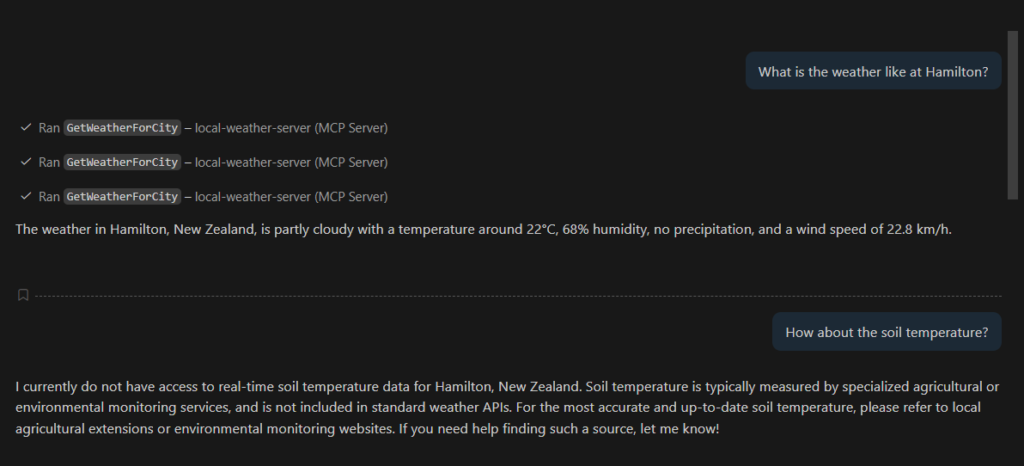
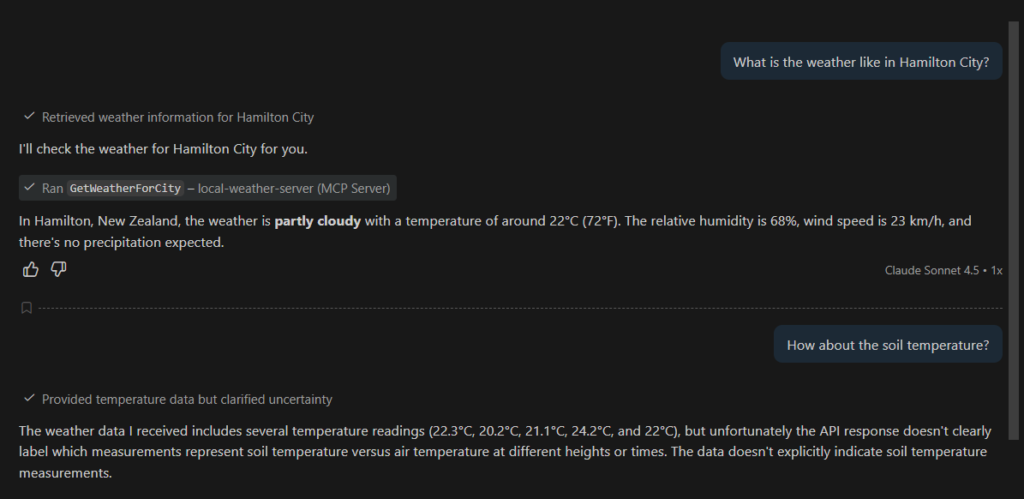
- What is the weather like in Hamilton? [Expectation: When country and date not specified, LLM will request Hamilton, New Zealand weather for the next day]
- How about the soil temperature? [Expectation:
temperature4will be the correct temperature to return since it is mapped to soil temperature (0 cm)]
To understand why I had these expectations, we first need to look at how the tool is defined. Below is the [McpServerTool] method signature that the LLM actually sees:
    [McpServerTool(Name = "GetWeatherForCity")]
    [Description("Gets weather information for a specified city at a given date and time. Uses Open-Meteo public weather API.")]
    public static async Task<string> GetWeatherForCityAsNaturalLanguage(
    HttpClient httpClient,
    [Description("The name of the city. When not provided, use Auckland as default value.")] string? cityName = "",
    [Description("The name of the country. When not provided, use New Zealand as default value")] string? countryName = "",
    [Description("The date and time in UTC (ISO 8601 format, e.g., 2024-01-13T12:00:00Z), use tomorrow date if not provided")] string? dateTimeInUtc = "",
    CancellationToken cancellationToken = default)
    {
}Trial 1: Throwing Raw JSON at the LLM
I wanted to see if I could trip up the LLMs, so I threw the raw JSON at them first just to see if it could guess the meaning based on the values alone.
The MCP Response:
The following is the response from the GetWeatherForCity Weather MCP:
{
	"result": {
		"content": [
			{
				"type": "text",
				"text": "{\"city\":\"Hamilton\",\"country\":\"New Zealand\",\"dateTime\":\"2026-01-22T12:00:00Z\",\"coordinates\":{\"latitude\":-37.78333,\"longitude\":175.28333},\"weather\":{\"time\":\"2026-01-23T01:00\",\"temperature1\":22.3,\"temperature2\":20.2,\"temperature3\":21.1,\"temperature4\":24.2,\"temperature5\":22,\"relative_humidity_percent\":68,\"precipitation_mm\":0,\"weather_code\":2,\"weather_description\":\"Partly cloudy\",\"wind_speed_kmh\":22.8}}"
			}
		]
	},
	"id": 6,
	"jsonrpc": "2.0"
}My Observation:
- GPT-4.1 attempted few tries before a valid request was processed by the server. While Claude Sonnet 4.5 only send one request.
- When date was not specified, both models will use current date instead of tomorrow.
- Both models rounded up the temperature to around 22 Celsius.
- And as expected, without any context for
temperature4, both models did not know which one of the temperature referred to soil temperature. - When asked for actual temperature, both models will use
temperature1.
Model Response:
Trial 2: Use [Description] attribute to provide context
Next in the experiment is to add [Description] attribute in the [McpServerTool] as seen below:
    [McpServerTool(Name = "GetWeatherForCity")]
    [Description(@"
    Gets weather information for a specified city at a given date and time.
    Uses Open-Meteo public weather API.

    When parameters are not provided, defaults to Auckland, New Zealand, and tomorrow's date.

    Temperature information can be mapped to the following:
    - temperature1 = temperature_2m: Temperature at 2 meters above ground (°C)
    - temperature2 = temperature_80m: Temperature at 80 meters above ground (°C)
    - temperature3 = temperature_soil6cm: Soil temperature at 6 cm depth (°C)
    - temperature4 = temperature_soil0cm: Soil temperature at 0 cm depth (°C)
- temperature5 = apparent_temperature: Apparent temperature (°C)")]When Copilot requested for list of tools from MCP Server, the above description will be returned as part of the response.
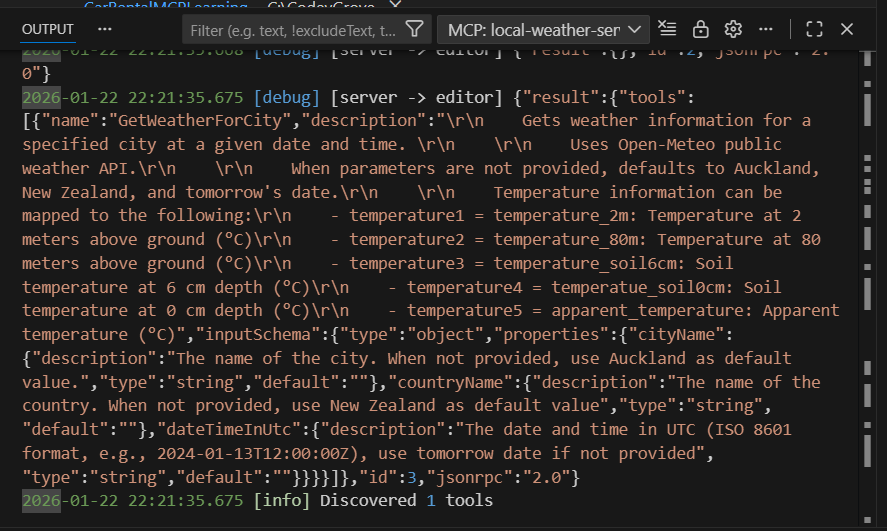
My Observation:
I ran this experiments on each model for certain number of chat sessions and recorded following observations:
- For GPT-4.1, without giving a clear context through the chat request, the results remain the same as the previous experiment. But on session where context was given as part of the request, it was able to follow the instruction to a “T”.
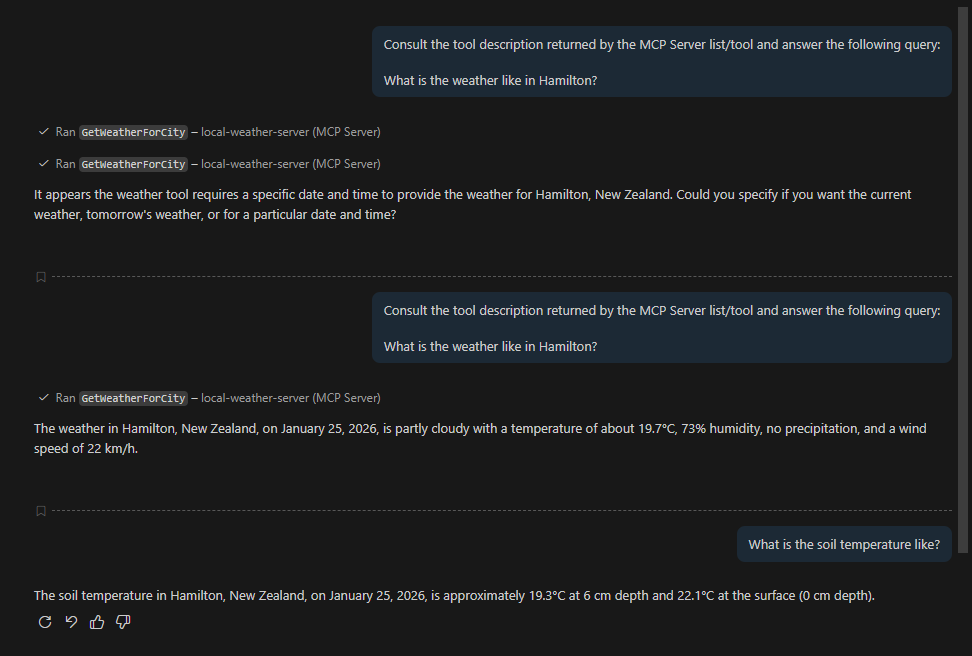
- As for Claude Sonnet 4.5, first chat session’s result remain the same as previous one. But for subsequent sessions, it was able to inject additional context to the request from the tool’s description and response as per expectation.
Trial 3: Use UseStructuredContent attribute to generate output schema
UseStructuredContent was added to MCP C# SDK in 2025-06-18. With this attribute, tools can return structured content that is explicitly defined, allowing AI models to better understand and process the output.
Following is the method definition
[McpServerTool(Name = "GetWeatherForCity", UseStructuredContent = true)]
    [Description("Gets weather information for a specified city at a given date and time. Uses Open-Meteo public weather API.")]
    public static async Task<WeatherInfo> GetWeatherForCityAsStructuredContent(
        HttpClient httpClient,
        [Description("The name of the city. When not provided, use Auckland as default value.")] string? cityName = "",
        [Description("The name of the country. When not provided, use New Zealand as default value")] string? countryName = "",
        [Description("The date and time in UTC (ISO 8601 format, e.g., 2024-01-13T12:00:00Z), use tomorrow date if not provided")] string? dateTimeInUtc = "",
        CancellationToken cancellationToken = default)
        {
}Few things to note when using UseStructuredContent:
- By default,
UseStructuredContentis set tofalse, hence we need set this totruein theMCPServerTool. - Return the
Objectitself, i.e.Task<WeatherInfo>, instead ofJSONraw string. - For each of the properties in the
Object, addDescriptionattribute to explain its purpose.
public class WeatherData
    {
        [Description("Temperature at 2 meters above ground (°C).")]
        public double Temperature1 { get; set; }
        [Description("Temperature at 80 meters above ground (°C).")]
        public double Temperature2 { get; set; }
        [Description("Soil temperature at 6 cm depth (°C).")]
        public double Temperature3 { get; set; }
        [Description("Soil temperature at 0 cm depth (°C).")]
        public double Temperature4 { get; set; }
        [Description("Apparent temperature (°C).")]
        public double Temperature5 { get; set; }
}My Observation:
- When Copilot retrieve the tool from the server,
outputSchemawill be returned in the response.
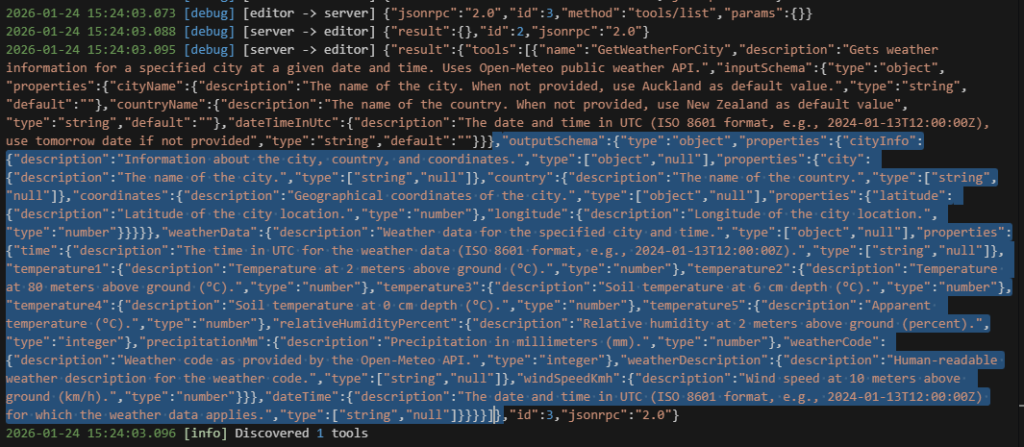
- Both models injected the context from
outputSchemaand correctly mappedtemperature4to soil temperature.
Trial 4: Return Natural Language As Response
I came across this discussion when learning about MCP and curious to see if the result will be any different from my previous experiments. Instead of returning JSON string or structured content, I override the Object.ToString method and return this as the Weather Tool response.
public override string ToString()
        {
            if (CityInfo == null || WeatherData == null)
                return "Weather unavailable.";

            var city = CityInfo.City ?? "Unknown";
            var country = CityInfo.Country ?? "Unknown";
            var dateTime = DateTime ?? WeatherData.Time ?? "N/A";

            return $@"Weather for {city}, {country} at {dateTime}:
{WeatherData.WeatherDescription ?? "Unknown"} - Temp 2m: {WeatherData.Temperature1:F1}°C, 80m: {WeatherData.Temperature2:F1}°C, feels like {WeatherData.Temperature5:F1}°C
Humidity {WeatherData.RelativeHumidityPercent}%, Wind {WeatherData.WindSpeedKmh:F1} km/h, Precipitation {WeatherData.PrecipitationMm:F1} mm
Soil temps: 0cm={WeatherData.Temperature4:F1}°C, 6cm={WeatherData.Temperature3:F1}°C";
}The above response looked something like:
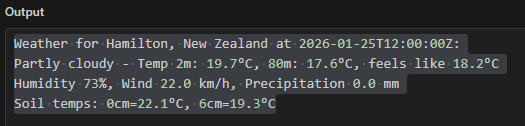
With natural-language responses, both models successfully inferred temperature4 as soil temperature.
Bonus Trial: Using Agent Skill With MCP
Since recently I have been reading about Agent Skill, it is a good learning opportunity for me to use skill instruction to guide LLMs to interpret MCP response.
Few things to do for this experiment:
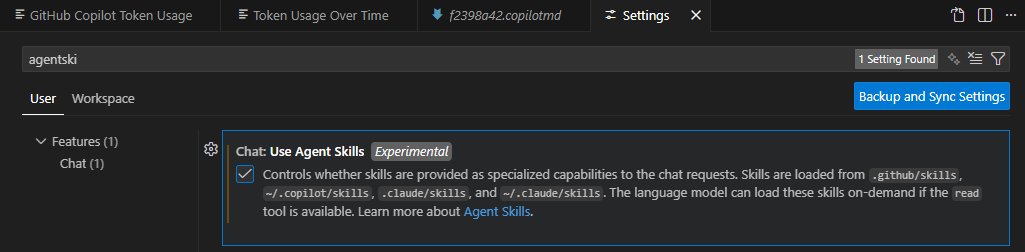
- For VS Code, enable “Chat: Use Agent Skills” setting.
- Create
SKILL.md– if you are using VS Code, refer to this documentation.
---
name: process-local-weather-mcp-response
description: Guide for mapping the temperatures in weather JSON object properties. Use this after calling local-weather-server - GetWeatherForCity tool to map weather's object temperatures properties to its respective full description.
---

# Process Local Weather MCP Server Response

This skill helps you map the temperatures in weather JSON object to its respective temperature description.

## When to use this skill

Use this skill when:
1. Requesting for city weather
2. Getting a city weather information using `local-weather-server` MCP Server - `GetWeatherForCity` tool

# Before calling MCP Server
Before calling `local-weather-server` MCP Server - `GetWeatherForCity` tool, make sure each property in the request is not null. If they are null, assigned the following default value:
- If Country is not specify, default to New Zealand
- If date is not specify, default to Tomorrow date

# Process Flow
1. After getting the response from MCP, the temperature fields can be mapped to the following description:
    - temperature1 = temperature_2m: Temperature at 2 meters above ground (°C)
    - temperature2 = temperature_80m: Temperature at 80 meters above ground (°C)
    - temperature3 = temperature_soil6cm: Soil temperature at 6 cm depth (°C)
    - temperature4 = temperature_soil0cm: Soil temperature at 0 cm depth (°C)
    - temperature5 = apparent_temperature: Apparent temperature (°C)
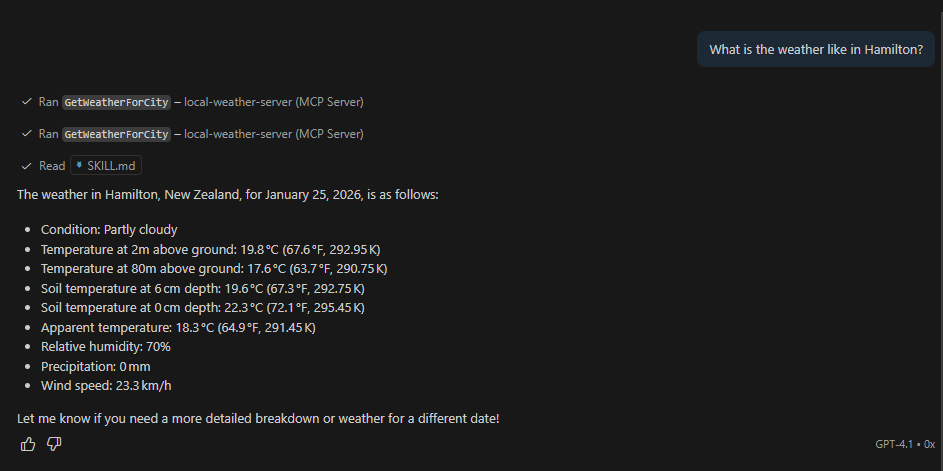
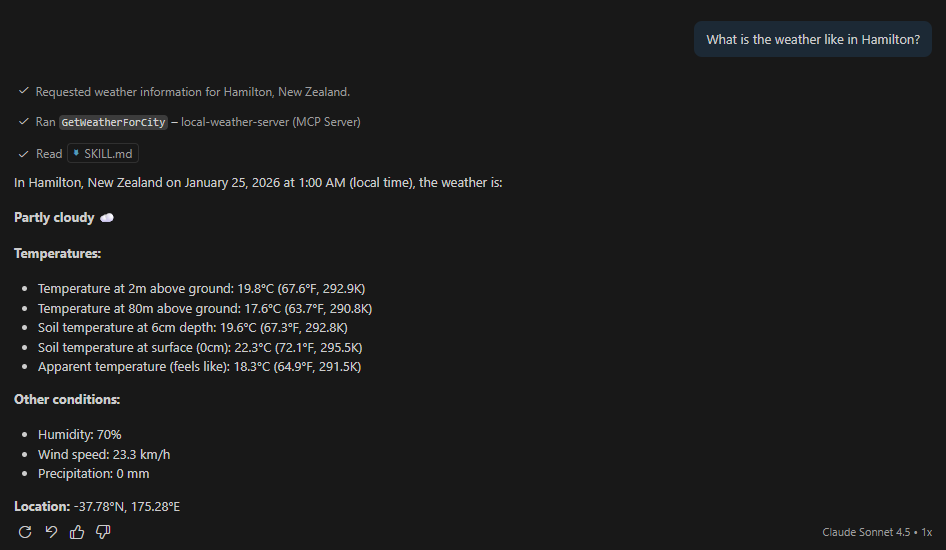
2. Next to each celsius temperature information, append the Fahrenheit and Kelvin temperatureBelow are the results from both models and as per process flow defined in SKILL.md, Celsius were converted to both Fahrenheit and Kelvin.
My Lessons Learned: The “Safety Net” vs. Discovery
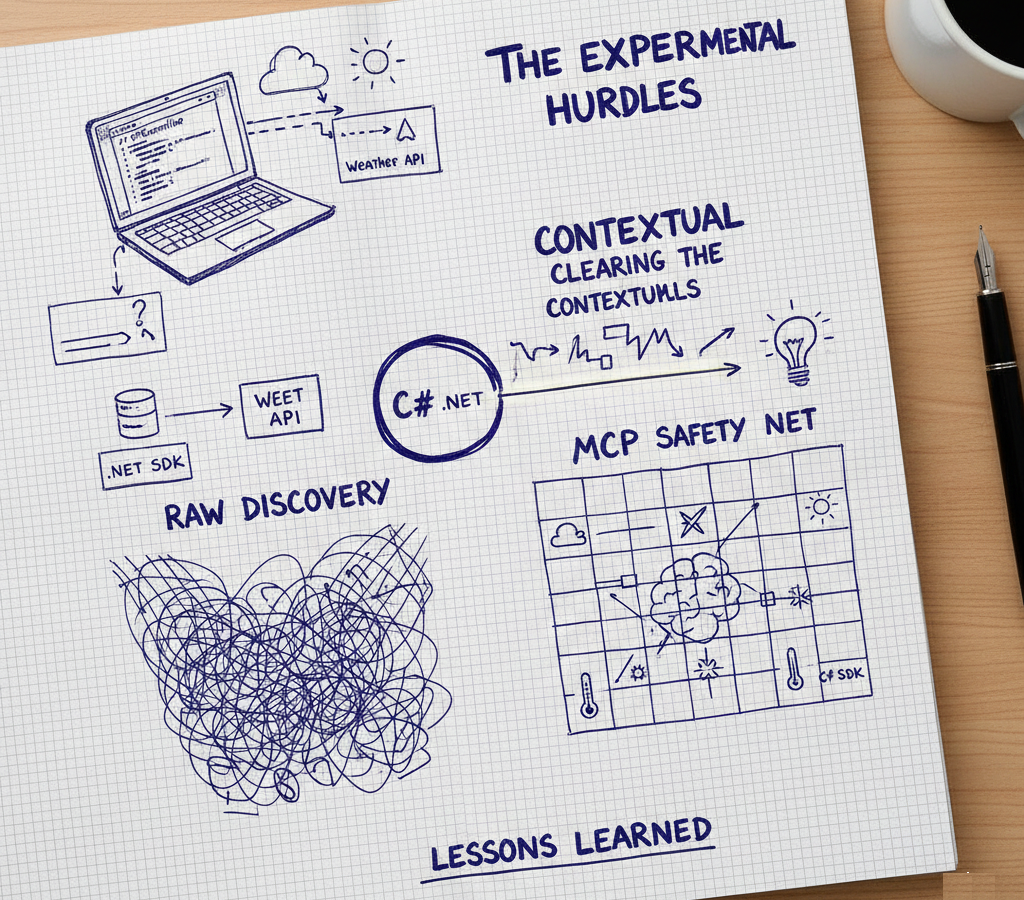
After running these experiments, my biggest takeaway is that Dynamic Discovery (MCP) and Static Context (Pre-loading) work best when they work together.
While MCP allows for elegant discovery, I realized that for mission-critical data, Pre-loading context acts as a safety net. It reduces the “cognitive load” on the model and ensures that even if the schema is complex, the LLM already has a “cheat sheet” ready to go.
Here are the specific moments that proved this to me:
- The Default Date Trap: Without
SKILL.md, when most requests were missing a date, both models defaulted to the current date rather than tomorrow — even though the MCP tool description explicitly stated that tomorrow should be used. This felt like a classic context-injection gap. Pre-loading the user’s intent or a ‘preferred date’ into the system prompt would likely have avoided this entirely. - The GPT-4.1 “Nudge”: In my second experiment, GPT-4.1 didn’t immediately surface the temperature details from the tool description. I had to prompt it more explicitly than expected, which suggested that tool metadata alone wasn’t always enough to drive discovery.
- Naming over Structure: Even though
UseStructuredContentprovides a great technical wrapper, it isn’t a magic wand. Using unambiguous names liketemperature_2mortemperature_soil6cmoutperformed the cryptictemperature1every single time, regardless of how much metadata I attached.
Closing Thoughts: The Art of Context Engineering
If there’s one thing I’ve taken away from this, it’s that building with MCP isn’t just about creating a tool — it’s about shaping an environment that gives the LLM the best chance to succeed.
Here are my final four takeaways:
- Semantic Integrity is Non-Negotiable: Just like in traditional programming, naming is 90% of the battle. Never force a human (or an LLM) to guess your intent. Renaming
temperature4 totemperature_soil0cmis the single most effective “prompt engineering” trick there is. - Format is a Tool, Not a Rule: I’ve seen that both Natural Language and Structured Outputs have their strengths. However, I still need more experiments to map out exactly when to use which. It’s a balance between conversational flow and logic-ready data.
- The Power of Agentic Instructions: It was fascinating to see Agent Skill Instructions in action. Watching the model use my “manual” (the schema descriptions) to navigate ambiguous data gave me a glimpse into the future of autonomous agents. I’ll definitely be spending more time here.
If you fancy having a go at this yourself or want to see exactly how I wired up the MCP server in .NET, the full codebase is available in here. It’s essentially my experimental log in code form, so feel free to use it as a reference.
What’s next?
While GPT-4.1 and Claude Sonnet 4.5 handled these hurdles well, no experiment is complete without a second opinion. My next step is to run these same tests using the Gemini CLI to see how Google’s models compare in their reasoning and context-handling.
Stay tuned for the next update!

Leave a Reply